


A human-friendly alternative to netstat for socket and port monitoring on Linux and macOS.
[!NOTE]
The master branch code and readme may include features that are not yet released. For the official, stable version and its documentation, please refer to the crates.io page.
✨ Highlights:
- pleasing to the eye thanks to a nice table view
- filterable and sortable output
- interactive killing of processes
- json and custom formattable output
- from
netstat -tulpntosomo -l - cross-platform support for Linux and macOS
- you can find all features further down
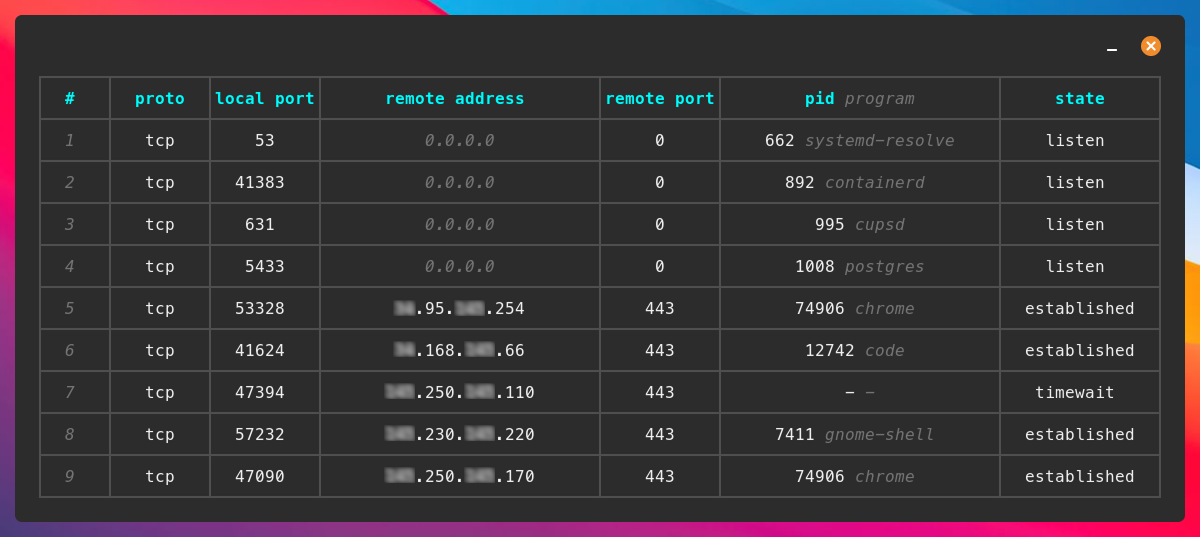
⬇️ Installation:
Using cargo:
cargo install somo
Most of the time, you’ll want to run this with sudo to see all processes and ports. To make that work, you can create a symlink so the binary can be run with root privileges:
sudo ln -s ~/.cargo/bin/somo /usr/local/bin/somo
sudo somo   # this works now
Or install directly from GitHub:
Warning: This will install the cutting-edge development version and may be unstable or contain incomplete features.
cargo install --git https://github.com/theopfr/somo
Debian:
If you use a Debian OS go to releases and download the latest .deb file.
Arch:
yay -S somo
Nix:
Warning: This will install the cutting-edge development version and may be unstable or contain incomplete features.
You can build it using Nix with Flakes:
nix build 'github:theopfr/somo?dir=nix'
sudo ./result/bin/somo
Homebrew:
Homebrew packages a somo formula for macOS and Linux.
brew install somo
🏃♀️ Running somo:
To run somo just type:
somo # or sudo somo
🚩 Features:
Click to see the somo --help summary!
A human-friendly alternative to netstat for socket and port monitoring on Linux and macOS.

Usage: somo [OPTIONS] [COMMAND]

Commands:
  generate-completions  Generate shell completions
  generate-config-file  Generate config file
  help                  Print this message or the help of the given subcommand(s)

Options:
  -k, --kill                       Display an interactive selection option after inspecting connections
      --proto <PROTO>              Deprecated: Use '--tcp' and '--udp' instead
  -t, --tcp                        Include TCP connections
  -u, --udp                        Include UDP connections
      --ip <IP>                    Filter connections by remote IP address
      --remote-port <REMOTE_PORT>  Filter connections by remote port
  -p, --port <PORT>                Filter connections by local port
      --program <PROGRAM>          Filter connections by program name
      --pid <PID>                  Filter connections by PID
      --format <FORMAT>            Format the output in a certain way, e.g., `somo --format "PID: {{pid}}, Protocol: {{proto}}, Remote Address: {{remote_address}}"`
      --json                       Output in JSON
  -o, --open                       Filter by open connections
  -l, --listen                     Filter by listening connections
  -e, --established                Filter by established connections
      --exclude-ipv6               Deprecated: Use '--ipv4' instead
  -4, --ipv4                       Get only IPv4 connections
  -6, --ipv6                       Get only IPv6 connections
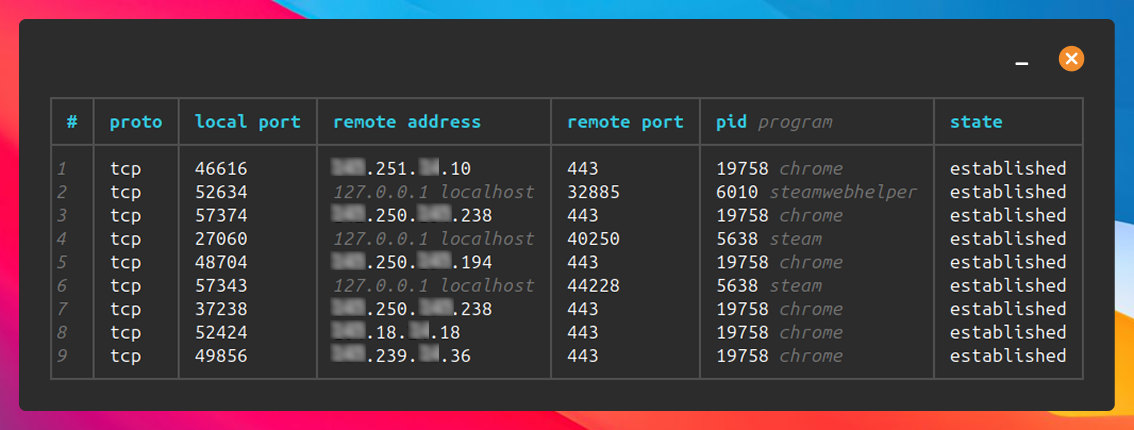
  -c, --compact                    Get compact table view
  -r, --reverse                    Reverse order of the table
  -s, --sort <SORT>                Sort by column name [possible values: proto, local_port, remote_address, remote_port, program, pid, state]
      --config-file                Retrieve config file path
      --no-config                  Ignore config file
  -a, --annotate-remote-port       Annotate remote port with service name and ephemeral tag
      --no-pager                   Never page output
  -h, --help                       Print help
  -V, --version                    Print version
✨ Filtering:
You can use the following flags to filter based on different attributes:
| filter flag | description | value |
|---|---|---|
--tcp, -t | filter by TCP connections | - |
--udp, -u | filter by UDP connections | - |
--proto | deprecated – use --tcp / --udp instead | tcp or udp |
--port, -p | filter by a local port | port number, e.g 5433 |
--remote-port | filter by a remote port | port number, e.g 443 |
--ip | filter by a remote IP | IP address e.g 0.0.0.0 |
--program | filter by a client program | program name e.g chrome |
--pid | filter by a PID | PID number, e.g 10000 |
--open, -o | filter by open connections | - |
--listen, -l | filter by listening connections | - |
--established, -e | filter by established connections | - |
--exclude-ipv6 | deprecated – use --ipv4 instead (mutually exclusive with --ipv6) | - |
--ipv4, -4 | filter by IPv4 connections | - |
--ipv6, -6 | filter by IPv6 connections | - |
✨ Compact table view:
To get a smaller, more compact table use the --compact, -c flag.
✨ Process killing:
With the --kill, -k flag you can choose to kill a process after inspecting the connections using an interactive selection.
✨ JSON and custom output format:
Using the --json flag you can choose to retrieve the connection data in JSON format.
You can also define a custom output format using the --format flag, for example:
somo --format "PID: {{pid}}, Protocol: {{proto}}, Remote Address: {{remote_address}}" # attributes must be specified in snake_case
In the format-string, the attributes have to be specified in snake_case.
✨ Sorting by columns:
The --sort, -s flag can be used to sort the table after a specific column ascending. For example:
somo --sort pid # column names must be specified in snake_case
To get a descending order, you can use the --reverse, -r flag.
✨ Config file for setting default flags:
You can create a config file that defines flags to be automatically applied every time you run somo.
- run
somo generate-config-fileto create the file - run
somo --config-fileto print the path to the config file - run
somo --no-configto ignore all default flags
For example, if your config file looks like this:
# View compact version of the table
--compact
# Sort by PID
--sort=pid
then somo will always show the table in compact mode, sorted by PID.
✨ Displaying port service names:
When using the --annotate-remote-port, -a flag, the table will display the corresponding service names for the listed ports as defined in the IANA Port Number Registry (for example, 443 -> https).
✨ Built-in paging:
When the rows of somos output exceed the terminal height, the output will be automatically piped into a pager. By default, less -R will be used if available. You can use either the SOMO_PAGER or PAGER environment variables to define what pager and settings should be used (SOMO_PAGER takes precedence). Paging can be deactivated using the --no-pager flag, for example by putting it into the config file.
🐚 Shell completions:
Somo supports shell completions for bash, zsh, fish, and elvish. Choose your shell:
- Bash:
mkdir -p ~/.local/share/bash-completion/completions somo generate-completions bash > ~/.local/share/bash-completion/completions/somo - Zsh:
mkdir -p ~/.local/share/zsh/site-functions somo generate-completions zsh > ~/.local/share/zsh/site-functions/_somo echo 'fpath=(~/.local/share/zsh/site-functions $fpath)' >> ~/.zshrc echo 'autoload -U compinit && compinit' >> ~/.zshrc - Fish:
mkdir -p ~/.config/fish/completions somo generate-completions fish > ~/.config/fish/completions/somo.fish - Elvish:
mkdir -p ~/.config/elvish/lib
somo generate-completions elvish > ~/.config/elvish/lib/somo.elv
echo 'use somo' >> ~/.config/elvish/rc.elv
🖥️ Platform Support:
Somo currently supports:
❤️ Contributing:
If you’d like to contribute to somo, please see the CONTRIBUTING.md guide.


