

🎹 MacroPad - ESP32-C3 Wireless Macro Keyboard
Transform your workflow with a custom 10-key programmable macro keyboard featuring dual connectivity (Bluetooth + USB), rotary encoder, and a sleek desktop configurator app.




✨ What Makes This Special?
🚀 Dual Connectivity — Connect via Bluetooth OR USB-C, or both simultaneously! USB automatically takes priority when plugged in, seamlessly falling back to Bluetooth when disconnected.
⚡ Instant Setup — USB auto-detection means zero configuration. Just plug it in and start mapping keys.
🎨 Beautiful UI — Modern dark material design with fully responsive layout. Works perfectly on any screen size.
🔧 Real-Time Debug — Built-in serial monitor shows live firmware output — debug your macros without leaving the app.
🎯 Infinite Possibilities — 10 programmable keys + rotary encoder with 5 rotation modes and custom key mappings.
🌟 Key Features
🔌 Connectivity
- 🔵 Bluetooth LE — Wireless freedom with auto-reconnect
- 🟦 USB Serial — Direct connection via USB-C (Web Serial API)
- ⚡ Dual Mode — Both connections work simultaneously, USB prioritized
- 🔄 Auto-Connect — Instantly detects and connects to USB devices
- ♻️ Smart Fallback — Seamlessly switches between transports
🎮 Hardware
- ⌨️ 10 Programmable Keys — 2×5 matrix layout with mechanical switches
- 🎚️ Rotary Encoder — Infinite rotation with tactile feedback + push button
- 🔋 Battery Monitor — Real-time battery level tracking (Bluetooth mode)
- 😴 Smart Sleep — Auto-sleep on inactivity (disabled when USB connected)
🖥️ Desktop App
- 🎨 Material Dark Theme — Eye-friendly interface with glass morphism
- 📱 Fully Responsive — Adapts beautifully to any window size
- 🔍 Serial Monitor — Live firmware debug console with pop-out window
- 👁️ Live Preview — Real-time visualization of key presses and encoder rotation
- 🎯 Visual Key Mapper — Click-to-configure with instant feedback
- 📂 Profile Manager — Save, load, import/export configurations
- 🔄 Device Sync — Push configs directly to device flash memory
- 🪟 System Integration — Tray icon, auto-startup, minimize to tray
🎹 Mapping Options
- ⌨️ Single Key — Any HID keyboard key (A-Z, F1-F12, modifiers)
- 🎛️ Key Combos — Multi-key shortcuts (Ctrl+C, Alt+Tab, Shift+Win+S)
- 🎵 Media Keys — Volume, playback, brightness controls
- 📝 Text Macros — Type entire phrases or commands
- 🚀 Launch Apps — Open programs, scripts, or shell commands
- 🔢 Multi-Step Macros — Complex keystroke sequences with delays
🎚️ Encoder Modes
- 🔊 Volume Control — System volume up/down
- 📜 Scroll — Mouse wheel simulation
- 🔍 Zoom — Ctrl+scroll for browser/app zoom
- ☀️ Brightness — Display brightness adjustment
- 🎯 Custom Keys — Assign any key combination (CW/CCW)
📦 What You'll Need
| Component | Qty | Description |
|---|---|---|
| 🧠 ESP32-C3 Mini | 1 | The brain — handles Bluetooth and USB |
| 🎚️ Rotary Encoder | 1 | Infinite rotation, push button (KY-040 or similar) |
| ⌨️ Cherry MX Switches | 10 | Your choice of tactile, clicky, or linear |
| 🎩 Keycaps | 10 | 1U standard size |
| ⚡ 1N4148 Diodes | 10 | For anti-ghosting (optional for 10-key) |
| 🔌 Wire | ~1m | 22-24 AWG solid core recommended |
| 🛠️ PCB/Perfboard | 1 | For clean assembly (or breadboard for testing) |
| 🏠 3D Printed Case | 1 | Optional but makes it look pro ✨ |
🖨️ Get the Case
Download STL: 9-Key + Encoder Case on MakerWorld
💡 Tip: The linked model is for 9 keys but easily adapts to our 2×5 layout!
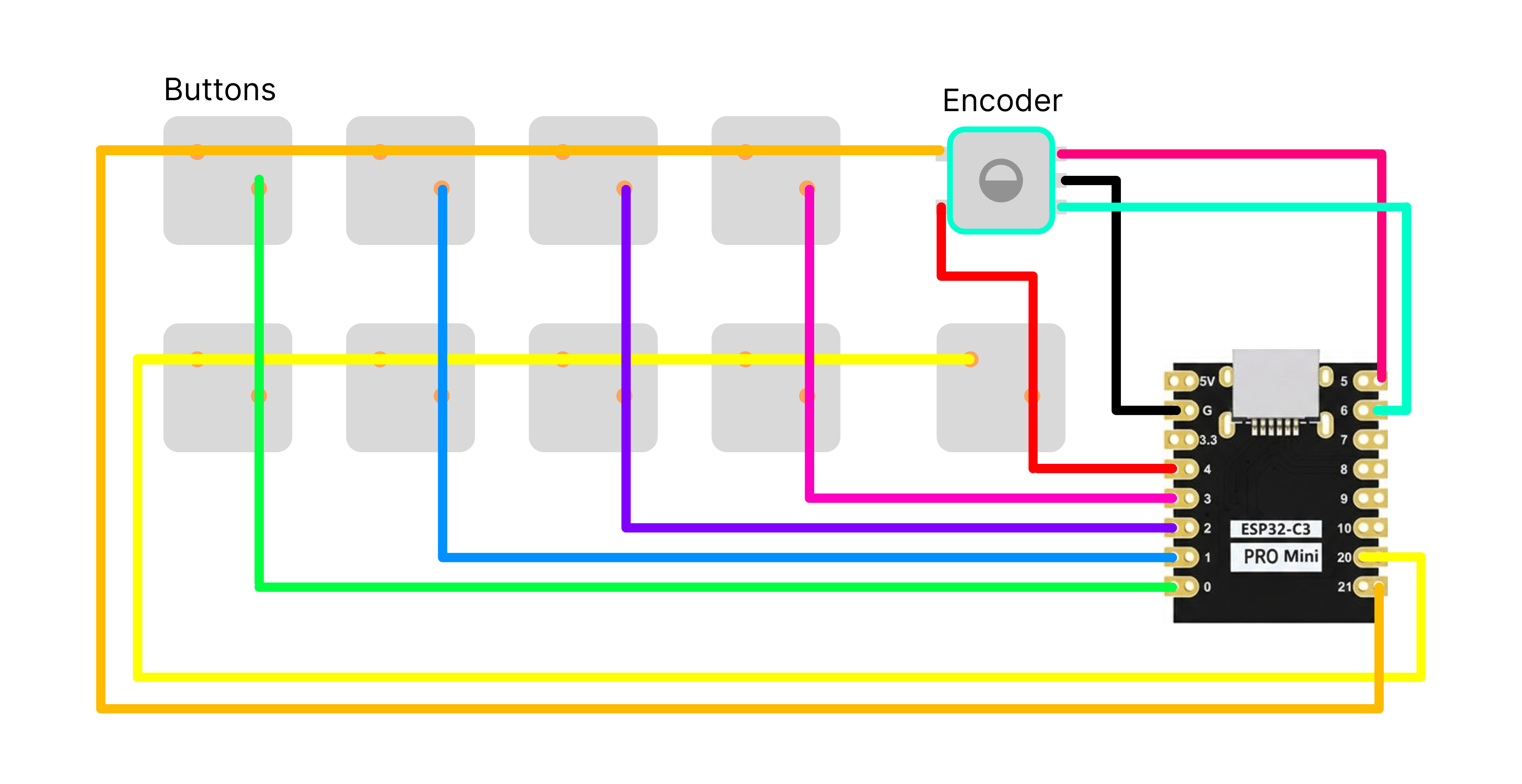
🔌 Pin Configuration
ESP32-C3 Mini Connections
| Function | Pin | Description |
|---|---|---|
| Matrix Rows | ||
| Row 1 | GPIO 21 | First row of key matrix |
| Row 2 | GPIO 20 | Second row of key matrix |
| Matrix Columns | ||
| Col 1 | GPIO 0 | Column 1 |
| Col 2 | GPIO 1 | Column 2 |
| Col 3 | GPIO 2 | Column 3 |
| Col 4 | GPIO 3 | Column 4 |
| Col 5 | GPIO 4 | Column 5 |
| Rotary Encoder | ||
| Encoder A | GPIO 5 | Quadrature signal A |
| Encoder B | GPIO 6 | Quadrature signal B |
| Encoder GND | GND | Ground |
| Encoder Button | R1×C5 | Connected to matrix position |
Key Matrix Layout
     C1   C2   C3   C4   C5
R1   K1   K2   K3   K4   K5/ENC_BTN
R2   K6   K7   K8   K9   K10
Note: The encoder button is wired to Row 1, Column 5 position (same as Key 5)
🔧 Circuit Diagram
🚀 Quick Start Guide
Step 1️⃣: Flash the Firmware
-
Grab the code:
git clone https://github.com/yourusername/macropad.git cd macropad/MacroPadSketch -
Open in Arduino IDE (or PlatformIO):
- Load
MacroPadSketch.ino - Install ESP32 board support (Espressif Systems)
- Install NimBLE-Arduino library (v1.4+)
- Load
-
Select your board:
- Board:
ESP32C3 Dev Module - Upload Speed:
921600 - USB CDC On Boot:
Enabled - Flash Mode:
QIO - Flash Size:
4MB - Partition Scheme:
Default 4MB with spiffs
- Board:
-
Hit Upload 🚀
💡 First-time tip: Hold the BOOT button while connecting USB if upload fails!
Step 2️⃣: Install the Desktop App
Option A: Download Installer (Easiest)
- Go to Releases
- Download
MacroPad-Setup-1.0.0.exe - Run installer — done! 🎉
Option B: Build from Source
cd MacroPadApp
pnpm install           # or npm install
pnpm run dev           # Development mode
# --- OR ---
pnpm run build         # Build production
pnpm run dist          # Create installer
Step 3️⃣: Connect & Configure
🔵 Bluetooth Mode
- Power on your MacroPad
- Open the desktop app
- Click "BT" button in top-right
- Select your device from the list
- ✨ You're connected!
🟦 USB Mode (Recommended)
- Plug in USB-C cable
- Open the desktop app
- That's it! — Auto-detects and connects automatically
- No drivers, no pairing, no hassle 🎯
🔥 Pro tip: Keep both Bluetooth paired AND USB plugged in. The app uses whichever is available, prioritizing USB for lower latency!
Step 4️⃣: Map Your Keys
- Click ⌨️ Key Mapper in the sidebar
- Click any key in the grid
- Choose mapping type (Single Key, Combo, Macro, etc.)
- Configure the action
- Click 📤 Apply to sync
- Your key is live! Test it immediately 🎮
Bonus: Try the 🎚️ Encoder section to customize rotation modes!
� Desktop App Features
🎨 Modern UI
- 📱 Fully Responsive — Works beautifully from small laptop screens to ultrawide monitors
- 🌙 Dark Mode — Easy on the eyes during late-night coding sessions
- ⚡ Real-time Updates — See key presses and encoder rotation instantly
- 📊 Live Dashboard — Monitor battery, connection status, and input activity at a glance
⌨️ Key Mapping Powerhouse
Configure each of the 10 keys with:
| Mapping Type | Description | Example Use |
|---|---|---|
| 🔤 Single Key | Any keyboard key | F13, Escape, Space |
| 🔀 Key Combo | Modifiers + key | Ctrl+Shift+T, Alt+F4 |
| 🎵 Media Keys | Playback controls | Play/Pause, Next Track, Volume |
| 📝 Text Macro | Type entire phrases | Email signature, code snippets |
| 🚀 Launch App | Open applications | notepad.exe, C:\Scripts\backup.bat |
| 🎮 Advanced | Custom sequences | Multi-step automation |
🎚️ Smart Encoder Modes
The rotary encoder is incredibly versatile:
- 🔊 Volume Control — Smooth system volume adjustment (default)
- 🖱️ Scroll Wheel — Vertical scrolling anywhere
- 🔍 Zoom —
Ctrl+ scroll for precise zoom control - ☀️ Brightness — Display brightness control (where supported)
- ⚙️ Custom Keys — Map rotation to any key combo (arrow keys, undo/redo, etc.)
- ♾️ Infinite Rotation — No limit! Encoder tracks steps indefinitely
Encoder Button: Click for separate action (mute, play/pause, etc.)
📡 Connectivity Options
Choose your connection style:
-
🟦 USB Mode:
- Zero-config auto-connect
- Lowest latency
- Plug-and-play
- Works while charging
-
🔵 Bluetooth Mode:
- Wireless freedom
- Multi-device support
- Background operation
- Lower power consumption
-
🔥 Dual Mode:
- Keep both connected!
- USB takes priority when plugged
- Seamless fallback to BT
- Best of both worlds
🔍 Serial Monitor
Built-in debug console for troubleshooting:
- Real-time firmware output
- Packet inspector
- Connection diagnostics
- Pop-out window support
- Always visible at bottom of Dashboard
⚙️ System Integration
- 📌 System Tray — Runs in background, accessible via tray icon
- 🚀 Auto-startup — Launch with Windows (optional)
- 💾 Profile Sync — Settings saved to device flash memory
- 🔔 Notifications — Connection events and updates
- 🎯 Auto-reconnect — Seamlessly reconnects on wake/unlock
�🛠️ Troubleshooting
🔌 USB Connection Issues
Problem: App doesn't see my MacroPad via USB
✅ Solutions:
- Check if another app (Arduino IDE, Putty, etc.) is using the serial port — close them!
- Try a different USB cable (data cable, not just power)
- Restart the MacroPad (unplug & replug)
- Check Device Manager (Windows) — should see "USB Serial Device (COMx)"
- Click the 📡 Serial Monitor at bottom — are you seeing data?
Still stuck?
- Open Serial Monitor in the app
- If you see scrambled text → wrong baud rate (should be 115200)
- If you see
[SERIAL] Bridge started→ firmware is working! - If you see nothing → try reuploading firmware with
USB CDC On Boot: Enabled
🔵 Bluetooth Connection Issues
Problem: Device not found in Bluetooth scan
✅ Solutions:
- Make sure Bluetooth is enabled on your PC
- Keep MacroPad close (< 3 feet) during first pairing
- Restart the MacroPad — LED should blink (advertising mode)
- Windows: Go to Settings → Bluetooth → "Add device"
- Try connecting via USB first, then switch to BT
Problem: Connected but keys don't work
✅ Solutions:
- Look at Event Log in Dashboard — seeing key events?
- Check Live Input panel — encoder/keys lighting up?
- Open Serial Monitor (if USB connected) — look for debug output
- Re-sync config: Go to Key Mapper → click 📤 Apply
⚙️ Firmware Upload Issues
Problem: Upload fails or "Device not found"
✅ Solutions:
- Hold BOOT button while plugging USB
- Select correct board:
ESP32C3 Dev Module - Enable
USB CDC On Boot: Enabledin Arduino IDE - Try slower upload speed:
115200instead of921600 - Check cable (some cheap cables are power-only!)
Problem: Code compiles but doesn't upload
✅ Solutions:
- Close Serial Monitor if it's open
- Press and hold BOOT, then press RESET, then release BOOT
- Try different USB port (direct to motherboard, not hub)
- Install CH340/CP2102 drivers if needed
🎚️ Encoder Not Working
Problem: Encoder spins but nothing happens in app
✅ Solutions:
- Check wiring: CLK → GPIO2, DT → GPIO3, SW → GPIO6
- Verify in Live Input — rotation counter changing?
- Try different encoder mode in Key Mapper → Encoder section
- Check Serial Monitor for
[ENC] Steps: Xmessages
Problem: Encoder is jittery or skips
✅ Solutions:
- Add 0.1µF capacitors between each encoder pin and GND
- Change encoder type in code (if mechanical → try different detent count)
- Check for loose connections
🖥️ Desktop App Issues
Problem: App won't start / crashes on launch
✅ Solutions:
- Delete
%APPDATA%\macropad-appfolder (resets settings) - Run as Administrator (right-click → "Run as administrator")
- Check antivirus — sometimes blocks serial port access
- Reinstall from latest release
Problem: Auto-connect keeps disconnecting
✅ Solutions:
- USB mode: Check cable quality — auto-reconnect should be instant
- Bluetooth mode: Increase connection interval in firmware
- Dual mode: If both connected, app prefers USB — disconnecting BT is normal
📊 Still Having Issues?
- Check Serial Monitor — most issues show debug messages!
- Look at Event Log on Dashboard — see what the device is sending
- Open an Issue on GitHub with:
- Serial Monitor output
- Event Log screenshot
- Connection mode (USB/BT)
- OS version
💡 Pro debugging tip: Keep Serial Monitor open while testing. It shows every packet, key press, and connection event in real-time!
🤝 Contributing
We'd love your help making this MacroPad even better! Whether it's:
- 🐛 Bug fixes — Squash those pesky issues
- ✨ New features — Add encoder modes, mapping types, or UI improvements
- 📚 Documentation — Help others understand and build
- 🎨 Design — Make it prettier, smoother, more intuitive
- 🧪 Testing — Try exotic configurations and report findings
How to contribute:
# 1. Fork this repo (click Fork button on GitHub)

# 2. Clone your fork
git clone https://github.com/YOUR-USERNAME/macropad.git
cd macropad

# 3. Create a feature branch
git checkout -b feature/my-awesome-feature

# 4. Make your changes, test thoroughly

# 5. Commit with a clear message
git commit -m "Add volume fine-tune mode to encoder"

# 6. Push to your fork
git push origin feature/my-awesome-feature

# 7. Open a Pull Request on GitHub
Code Style:
- TypeScript for app code
- Arduino/C++ for firmware
- Follow existing patterns and formatting
- Comment complex logic
Found a bug? Open an issue with:
- Steps to reproduce
- Expected vs actual behavior
- Serial Monitor output (if relevant)
- Screenshots/screen recordings help!
📄 License
This project is open source under the MIT License — you're free to:
- ✅ Use it for personal or commercial projects
- ✅ Modify and customize to your heart's content
- ✅ Share and distribute
- ✅ Build upon it and make something amazing
See the LICENSE file for the legal details.
TL;DR: Build it, hack it, sell it, share it — just keep the license notice. 🎉
🌟 Author


🙏 Acknowledgments
- 💙 ESP32-Arduino community for excellent libraries and support
- ⚡ Electron team for the incredible desktop framework
- ⌨️ Mechanical keyboard enthusiasts for endless inspiration
- 🖨️ MakerWorld community for 3D printing resources and case designs
- 🎨 Tailwind CSS for making beautiful UIs actually enjoyable to build
💬 Support & Community
- 🐛 Bug Reports: Create an Issue
- 💡 Feature Requests: Discussions
- 📖 Documentation: Wiki (detailed guides & assembly tips)
- 💬 Questions: Discussions Q&A
⭐ Star this repo if you found it helpful!
Built something cool with this? Share it in Show & Tell discussions!
Happy macro-ing! 🎹✨
Made with ❤️ and lots of ☕


